


Jim: sell & get paid instantly
4.4477.00 Reviews
App Specs
- Version
- 1.4.19
- Updated On
- License
- Free
- Downloads
- 100,000+
- Developer
- CloudWalk
- Categories
- Finance
- Platform
- Android
Screenshots
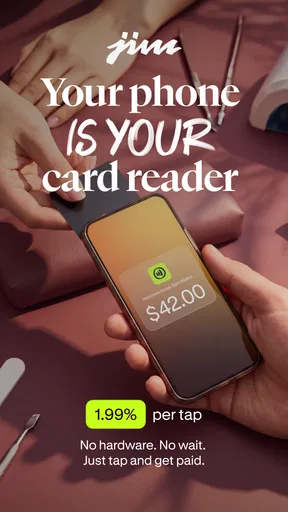
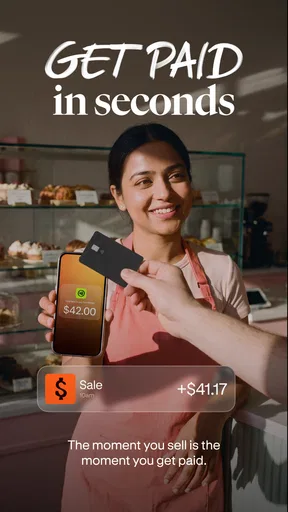
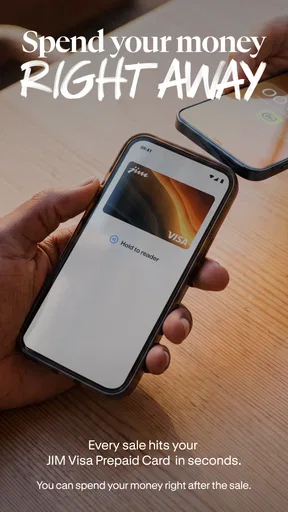
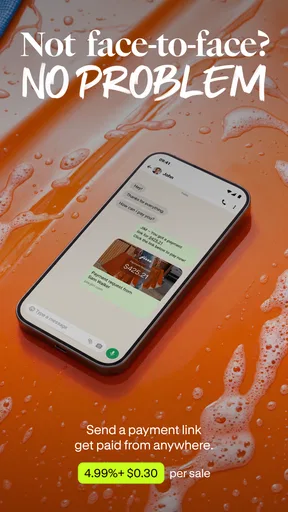
 Analysis by AppCompare
JIM.com: Instant Tap to Pay is built around a simple promise: make it easier for a small business or solo seller to accept a card payment without carrying a separate reader. That idea is appealing when I’m helping at a market stall, taking payment after a one-off service, or selling something away from a fixed checkout. But a fast tap is only useful if the whole process—from setup to confirming a payment—fits the way I actually work.
That distinction matters because this is a finance app for receiving payments, not a general wallet I would choose just to pay for coffee. CloudWalk is the developer, and the app is free to download. Its 4.3 average from around 686 ratings and more than 100,000 installs suggest that people are trying it, though those figures alone can’t tell me whether it suits a particular business or device. I would treat it as a tool to test against my own checkout routine, rather than assume it replaces every payment option.
What “fast” means in a real checkout
The appeal is reducing the amount of equipment between a customer and a completed sale. If the phone is already in my hand, accepting a tap could mean less rummaging for a reader and fewer items to pack before leaving for an appointment. That is a practical kind of speed: fewer objects and steps to manage, not a promise that every transaction will finish instantly in every situation.
For a smooth handoff, I’d have the app ready before the customer reaches for a card or phone. I’d also keep the device charged and make sure I can see the payment result before moving on. Those habits sound small, but they matter when a queue is forming. A tap-based checkout can remove hardware friction while still depending on the phone, the customer’s payment method, and a clear confirmation at the end.
Busy periods and the trade-off of using one phone
The phone-as-reader approach is most useful when sales are occasional or I need to take payment away from a counter. It is less obviously suited to a crowded shop where one device must handle a steady stream of transactions while also serving as the owner’s personal phone. A call, a low battery, or someone needing the phone for another task could interrupt the checkout flow even if the payment app itself is straightforward.
I’d think through the busiest ten minutes of my day before relying on it. Could I keep the phone accessible, avoid switching between unrelated tasks, and give each customer enough attention to confirm the result? If not, a dedicated reader or a separate checkout device may be a calmer choice. The convenience of carrying less equipment is real, but it comes with a dependency on the phone being available at the exact moment a customer is ready to pay.
Reliability is more than a successful tap
For a seller, a dependable payment routine includes knowing what happened after the customer taps. I’d pause long enough to check the app’s on-screen outcome and transaction record rather than rely on a sound, a customer’s assumption, or a hurried glance. That is especially sensible when the connection is noisy, the customer is in a hurry, or several people are waiting.
Worth Reading Before You Choose

EA SPORTS FC Mobile 26 Is a Bigger Football Game, but It Takes Time

Flipboard Shows What News Apps Must Do Beyond the Feed

Switching to Android Auto Means Rethinking Your Driving Routine

Google Calendar Makes a Crowded Week Easier to Manage

Ludo King Makes the Most of the Minutes Between Plans

Baby Panda World Brings Quick Play to Modern Phones, but Its Game Library Feels Busy
I would also keep a backup way to take payment for situations where the phone is unavailable or a tap does not complete as expected. That is not a knock against this app; it is ordinary planning for any phone-based checkout. If taking payment is central to a time-sensitive business, a second method can prevent a technical hiccup from becoming an awkward conversation or a lost sale.
Device fit and practical expectations
The app is listed for devices running Android 7.0 or later, and its age rating is Everyone. Before building a routine around it, I’d check that the phone I plan to use meets that requirement and behaves comfortably during a full workday. An older compatible device may still feel slow or have a tired battery, so meeting the minimum operating-system requirement should not be confused with guaranteeing a smooth experience.
It is also worth separating what a tap-to-pay workflow offers from what a full point-of-sale setup might provide. If I need a staffed till, a large screen, or a more structured checkout environment, I would compare those options instead of assuming a phone app will cover every business need. JIM.com may be a sensible fit for portability; the right choice still depends on how many people use the checkout and how much process the sale requires.
Effortless Transactions
So, what’s the deal with this app?JIM.com: Instant Tap to Pay is all about making your life easier when it comes to payments. You just tap, and boom, transaction done! It’s designed to work seamlessly with both Android and iOS, so no matter what device you’re using, you’re good to go.
The setup is super straightforward. You link your bank account or credit card, and you’re ready to roll. The app integrates with various payment systems, so it doesn’t matter if you’re at a local cafe or a big retail store—you can pay instantly.
Security and Privacy
Now, I know what you’re thinking—is it safe? Rest assured, security is a top priority for JIM.com: Instant Tap to Pay. The app uses advanced encryption methods to keep your data secure. Plus, it doesn’t store your card details, which is a relief for all of us who worry about privacy.
The app also offers biometric authentication, like fingerprint or facial recognition, adding an extra layer of security. So, you can tap away without any worries.
User Experience
The user interface is sleek and intuitive. You don’t need to be tech-savvy to navigate through it. Everything from checking your transaction history to updating your payment methods is just a few taps away.
One feature I particularly love is the ability to split bills easily. Whether you’re dining with friends or sharing a ride, you can split the cost without any hassle. No more awkward “who owes what” conversations!
Rewards and Benefits
Who doesn’t love a good reward? With JIM.com: Instant Tap to Pay, you can earn points on every transaction. These points can be redeemed for discounts, gift cards, and more. It’s like getting a little treat every time you spend.
If you’re a frequent traveler, you’ll appreciate the app’s ability to handle multiple currencies. It automatically converts to the local currency, saving you from those pesky foreign transaction fees.
Support and Community
If you ever run into issues, the support team is just a tap away. They’re responsive and ready to help with any concerns you might have. Plus, there’s a growing community of users who share tips and experiences, making it easier to get the most out of the app.
I also appreciate the regular updates and new features that keep popping up. It’s clear that the developers are committed to improving the app constantly.
Final Thoughts
In a world where time is of the essence, JIM.com: Instant Tap to Pay is a game-changer. It’s convenient, secure, and offers fantastic rewards. Whether you’re a tech enthusiast or someone who just wants a simpler way to pay, this app is definitely worth checking out.
So, if you’re tired of the usual payment hassles, give it a go. It might just become your new favorite app. And hey, who doesn’t love having one less thing to worry about?
Who I’d recommend it to—and who should compare first
I’d consider JIM.com when I sell occasionally, travel between work locations, or provide a service where carrying a conventional terminal would be inconvenient. Picture a craft seller finishing a conversation with a customer at a weekend market: instead of packing a separate reader, the seller can use the phone already needed for messages and scheduling. The useful detail is to keep the payment step distinct from the sales conversation—prepare the phone, accept the tap, then verify the result before wrapping the item.
For a business with a fixed counter and frequent transactions, I’d compare the app with a dedicated card reader or point-of-sale system. Those alternatives may be preferable when the phone needs to stay free for calls, when several staff members share checkout duties, or when a larger screen and a settled counter routine matter more than portability. The choice is not simply “new versus old”: it is whether a phone-based workflow is dependable in the place where customers actually pay.
A useful trial is to run a few low-pressure transactions before making the app your only method. That gives me a chance to learn where the confirmation appears, how to find a completed transaction afterward, and how long the handoff feels with my own device. I’d do this at a quiet time rather than discover the workflow during a line. It is a low-effort way to judge practical speed without assuming that the same result will feel identical on every phone.
Small workflow choices that can prevent confusion
One non-obvious trade-off with phone-based acceptance is that the seller and the customer may be looking at the same small device during the most important moment. I’d angle the screen so I can check the outcome without making the customer feel rushed, and I’d avoid handing the phone over unless the workflow calls for it. A clear, consistent handoff makes it easier to distinguish a completed sale from a tap that needs another attempt.
I’d also separate payment confirmation from later bookkeeping. After a busy stretch, checking the transaction history can help me reconcile what I remember selling with what the app recorded. That is more useful than relying on memory at closing time, especially if I accepted payments between other tasks. The history is a practical reference, but it does not replace whatever records a business needs for its own accounting.
Another sensible habit is to decide in advance what I’ll do if a customer’s first attempt does not appear to complete. I would check the app before asking for another tap, so neither person has to guess whether a payment went through. If the phone is unresponsive or unavailable, I’d calmly switch to the backup method I prepared. That small plan reduces the risk of accidental duplicate attempts and keeps a minor interruption from turning into a stressful scene.
Questions worth settling before depending on it
People often want to know whether a phone can become their entire checkout setup. I would not assume that from the tap-to-pay idea alone. The right answer depends on the seller’s routine: an independent worker handling occasional in-person sales may need little more than a simple acceptance flow, while a busy operation may need staff access, broader sales management, or equipment designed to stay at a counter. I’d match the app to the actual job rather than stretch it into a system it was not chosen to be.
Another reasonable concern is whether the experience will feel quick on an older phone. The supported Android floor is version 7.0, but a compatible operating system does not guarantee that every device will feel equally responsive. I’d use the phone I expect to carry at work, keep it charged, and test the complete flow in the place where I sell. If it feels awkward before the rush, I would not count on it becoming easier under pressure.
Users may also wonder what to do when a customer cannot complete a tap. My practical answer is to avoid improvising while a queue grows: explain that you’ll check the payment status, verify what the app shows, and then offer another accepted method if needed. A backup is especially valuable for sellers who cannot afford to pause a service or let one phone problem block every sale.
A measured performance verdict
JIM.com is currently at version 1.3.44, and its release date is January 5, 2026. I’d treat version details as a reason to check that my installed copy is current, not as proof of speed or stability by themselves. Performance is something I’d judge through the whole routine—opening the app, presenting the payment step, confirming the result, and returning to work—on the device I’ll actually use.
My overall view is that the phone-as-reader approach has a clear advantage when portability and fewer devices matter more than a dedicated checkout station. It can make sense for mobile sellers and occasional in-person payments, provided the phone is ready and there is a fallback plan. If my work depends on uninterrupted, high-volume checkout, I’d compare a dedicated reader before committing. That is the difference between a clever shortcut and a reliable fit: the best option is the one that stays easy to use when customers are waiting.
Pros
- Seamless payment integration.
- User-friendly interface.
- Supports multiple currencies.
- Quick transaction processing.
- Strong encryption for security.
Cons
- Limited customer support options.
- Requires stable internet connection.
- Not available in all regions.
- May incur transaction fees.
- Occasional app crashes on updates.
FAQs for Jim: sell & get paid instantly
What is JIM.com: Instant Tap to Pay?
JIM.com: Instant Tap to Pay is a mobile payment app that allows users to make purchases with a simple tap of their smartphone at any compatible terminal. It integrates with various credit and debit cards, providing a secure and efficient way to manage transactions without the need for physical cards.
How secure is JIM.com for transactions?
JIM.com employs advanced encryption technologies to ensure that all transactions are secure. It uses tokenization to protect card information, meaning your actual card details are never shared with merchants. Additionally, the app requires biometric authentication or a secure PIN to authorize payments, adding an extra layer of protection.
Can I use JIM.com with any bank or card issuer?
JIM.com supports a wide range of major banks and card issuers. However, it’s important to verify if your specific bank or card is compatible with the app. You can check the app’s supported financial institutions list on their website or contact your bank for confirmation.
Is JIM.com available for both Android and iOS devices?
Yes, JIM.com is available for download on both Android and iOS platforms. The app is designed to work seamlessly across different devices, ensuring that users have a consistent experience whether they are using an Android phone or an iPhone.
Are there any fees associated with using JIM.com?
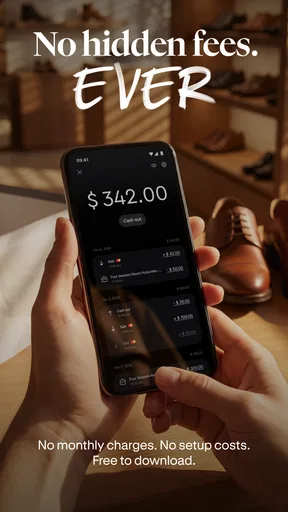
JIM.com itself does not charge users for downloading or using the app for transactions. However, it's advisable to check with your bank or card issuer as they may impose fees for using mobile payment services. Always review the terms and conditions related to mobile payments with your financial institution.


